Digital Silo’s UI

If you are not familiar with Digital Silo, please take your time and read through its document first.
The UI to display grains’ progress
We have prepared an open-source UI to display the progress of processing grains in Digital Silo. A demo version of Digital Silo’s UI is operational here.
The UI pops up a dialog box for the very first time to prompt the users to enter the following key entries:
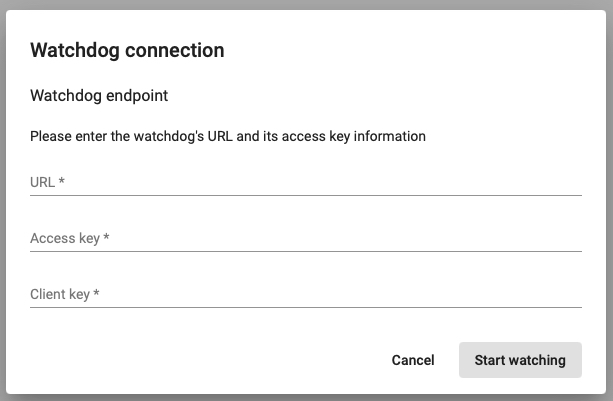
- URL: The URL of Watchdog according to the names provided to Terraform during provisioning
- Access key: Watchdog’s access key (Function Key), which will be available on Azure after provisioning
- Client key: This key must be consistent with the client key of the application that submits grains’ payloads to Gateway, or the grains’ progress will not be captured and displayed in real-time.
The UI’s main page consists of the following tabs:

- Seeded grains tab to display the submitted grains payloads and ready to process
- In-progress grains tab to display the grains payloads that are in progress
- Failed grains tab to display the list of grains payloads that failed
- Completed grains tab to display the list of successfully processed grains payloads
Technology
This project was generated with Angular CLI version 12.0.5.
Development server
Run ng serve for a dev server. Navigate to http://localhost:4200/. The app will automatically reload if you change any of the source files.
Code scaffolding
Run ng generate component component-name to generate a new component. You can also use ng generate directive|pipe|service|class|guard|interface|enum|module.
Build
Run ng build to build the project. The build artifacts will be stored in the dist/ directory. Use the --prod flag for a production build.
Running unit tests
Run ng test to execute the unit tests via Karma.
Running end-to-end tests
Run ng e2e to execute the end-to-end tests via Protractor.
The product’s website
Please visit the product’s website for further information.